文章来源:网络作者:南鸢发布时间:2026-05-23 16:58:56
我们在Win10系统中进行操作的时候,有时会遇上一些文件需要trustedinstaller权限才能操作,trustedinstaller权限是系统内部最高权限,使用安全选项卡中也不能获得这个权限,那么如何解决呢?其实我们可以在Win10右键菜单中添加“获得trustedinstaller权限”对着文件操作即可。
Win10获得trustedinstaller权限步骤:
1、首先打开记事本或在桌面上新建一个文本文档,将下面代码粘贴到记事本中,另然为 “获取trustedinstaller权限.reg”
Windows Registry Editor Version 5.00
[HKEY_CLASSES_ROOT\*\shell\runas]
@="获取TrustedInstaller权限"
[HKEY_CLASSES_ROOT\*\shell\runas\command]
@="cmd.exe /c takeown /f \"%1\" && icacls \"%1\" /grant administrators:F"
"IsolatedCommand"="cmd.exe /c takeown /f \"%1\" && icacls \"%1\" /grant administrators:F"
[HKEY_CLASSES_ROOT\Directory\shell\runas]
@="获取TrustedInstaller权限"
;www.winwin7.com
"NoWorkingDirectory"=""
[HKEY_CLASSES_ROOT\Directory\shell\runas\command]
@="cmd.exe /c takeown /f \"%1\" /r /d y && icacls \"%1\" /grant administrators:F /t"
"IsolatedCommand"="cmd.exe /c takeown /f \"%1\" /r /d y && icacls \"%1\" /grant administrators:F /t"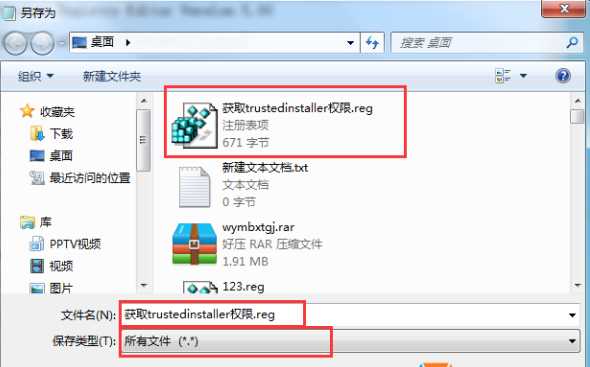

梦想三国之勇往直前0.1折

炼仙传说0.1折
仙侠01折
充值享永久0.1折福利,登录每日领2000免费代金券;;

不可思议的刀剑与魔法0.1折
卡牌01折
进游立送真充卡,开局自带“钞能力”

逍遥浪人
卡牌
1折送绝版皮肤 全场充值永久1折,创角即送“黑神话”孙悟空绝版皮肤。

奇幻梦旅人
休闲
当个无忧无虑的旅人,尽情享受这个童话世界吧!

玄影0.1折
仙侠01折
全场充值永享0.1折!

点击冒险之旅(0.1折特级行...
卡牌01折
上线福利:登录即送创角大礼包,召唤顶级战力!

天神赵子龙0.1折
卡牌01折
全新0.1折放置卡牌,打破传统三国叙事,解锁新颖剧情,每日送1000代金;

九州异兽记0.1折
开箱01折
1分钱买SSR异兽

龙魂魔法0.1折
185传奇996传奇
上线即送:自动拾取、自动回收、切割+222、老男孩·称号!

魔药杂货铺什么时候出 公测上线时...