文章来源:网络作者:趁年轻发布时间:2026-05-23 00:11:45
今天给大家普及一下如何使用微信小程序的label标签?下面就一起去看一看,了解了解,相信可以帮助到大家的。
组件说明:
label标签,和html的label极其类似。label 元素不会向用户呈现任何特殊效果。不过,它为鼠标用户改进了可用性。如果您在 label 元素内点击文本,就会触发此控件。就是说,当用户选择该标签时,就会自动将焦点转到和标签绑定的表单控件上,主要用来改进表单组件的可用性。
使用for属性找到对应的id,或者将控件放在该标签下,当点击时,就会触发对应的控件。
for优先级高于内部控件,内部有多个控件的时候默认触发第一个控件。
目前可以绑定的控件有:, , ,
组件用法:
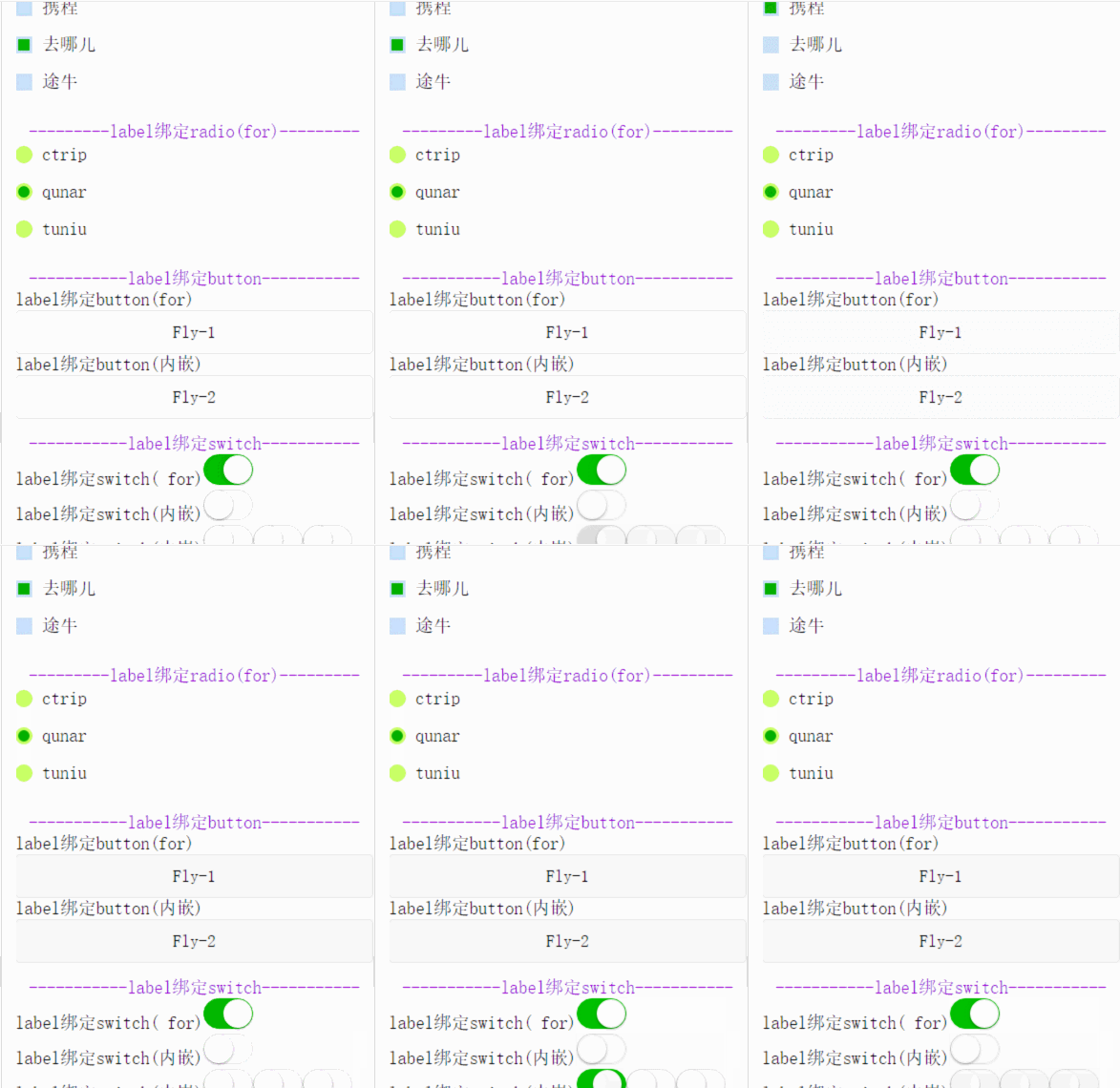
wxml
复制代码
js
Page({
data: {
checkboxItems: [
{name: \'ctrip\', value: \'携程\', checked: \'true\'},
{name: \'qunar\', value: \'去哪儿\'},
{name: \'tuniu\', value: \'途牛\'}
],
radioItems: [
{name: \'ctrip\', value: \'携程\'},
{name: \'qunar\', value: \'去哪儿\', checked: \'true\'},
{name: \'tuniu\', value: \'途牛\'}
],
hidden: false
},
checkboxChange: function(e) {
var checked = e.detail.value
var changed = {}
for (var i = 0; i < this.data.checkboxItems.length; i ++) {
if (checked.indexOf(this.data.checkboxItems[i].name) !== -1) {
changed[\'checkboxItems[\'+i+\'].checked\'] = true
} else {
changed[\'checkboxItems[\'+i+\'].checked\'] = false
}
}
this.setData(changed)
},
radioChange: function(e) {
var checked = e.detail.value
var changed = {}
for (var i = 0; i < this.data.radioItems.length; i ++) {
if (checked.indexOf(this.data.radioItems[i].name) !== -1) {
changed[\'radioItems[\'+i+\'].checked\'] = true
} else {
changed[\'radioItems[\'+i+\'].checked\'] = false
}
}
this.setData(changed)
},
testLabelBindButton_1:function(){
console.log("奔走相告,button通过for可以绑定成功啦!!!");
},
testLabelBindButton_2:function(){
console.log("奔走相告,button通过内嵌可以绑定成功啦!!!");
}
})
复制代码
wxss
.label-1, .label-2{
margin-bottom: 15px;
}
.label-1__text, .label-2__text {
display: inline-block;
vertical-align: middle;
}
.label-1__icon {
position: relative;
margin-right: 10px;
display: inline-block;
vertical-align: middle;
width: 18px;
height: 18px;
background: #CAE1FF;
}
.label-1__icon-checked {
position: absolute;
top: 3px;
left: 3px;
width: 12px;
height: 12px;
background: #1aad19;
}
.label-2__icon {
position: relative;
display: inline-block;
vertical-align: middle;
margin-right: 10px;
width: 18px;
height: 18px;
background: #CAFF70;
border-radius: 50px;
}
.label-2__icon-checked {
position: absolute;
left: 3px;
top: 3px;
width: 12px;
height: 12px;
background: #1aad19;
border-radius: 50%;
}
.section__title{
display: block;
text-align: center;
color: #9400D3;
}
.content{
padding-bottom: 15px;
}
复制代码
以上就是如何使用微信小程序的label标签?的全部内容了,大家都学会了吗?

梦想三国之勇往直前0.1折

炼仙传说0.1折
仙侠01折
充值享永久0.1折福利,登录每日领2000免费代金券;;

不可思议的刀剑与魔法0.1折
卡牌01折
进游立送真充卡,开局自带“钞能力”

逍遥浪人
卡牌
1折送绝版皮肤 全场充值永久1折,创角即送“黑神话”孙悟空绝版皮肤。

奇幻梦旅人
休闲
当个无忧无虑的旅人,尽情享受这个童话世界吧!

玄影0.1折
仙侠01折
全场充值永享0.1折!

点击冒险之旅(0.1折特级行...
卡牌01折
上线福利:登录即送创角大礼包,召唤顶级战力!

天神赵子龙0.1折
卡牌01折
全新0.1折放置卡牌,打破传统三国叙事,解锁新颖剧情,每日送1000代金;

九州异兽记0.1折
开箱01折
1分钱买SSR异兽

龙魂魔法0.1折
185传奇996传奇
上线即送:自动拾取、自动回收、切割+222、老男孩·称号!

魔药杂货铺什么时候出 公测上线时...