文章来源:网络作者:孤己i发布时间:2026-05-23 14:24:09
实体机是Win7,在Virtualbox虚拟机上安装了一个Linux操作系统,需要设置一个共享文件夹,这里给还不会设置的朋友分享一下教程,其实并不难。
虚拟机主机共享文件夹具体设置步骤如下:
操作方法如下:
1、点击虚拟机 设置-->选择 共享文件夹
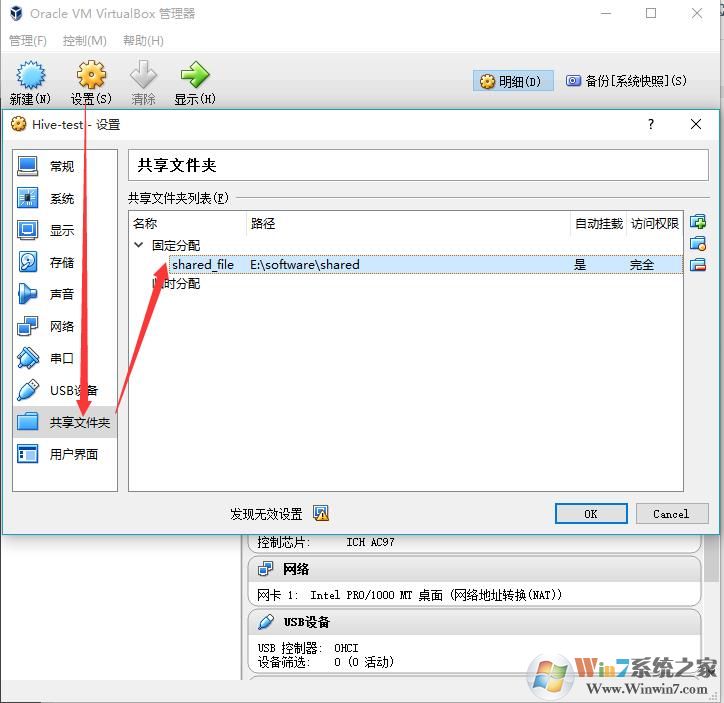
(图1 设置共享文件夹)
2、点击加号创建一个共享文件夹,设置共享文件夹路径,分配方式,是否自动挂载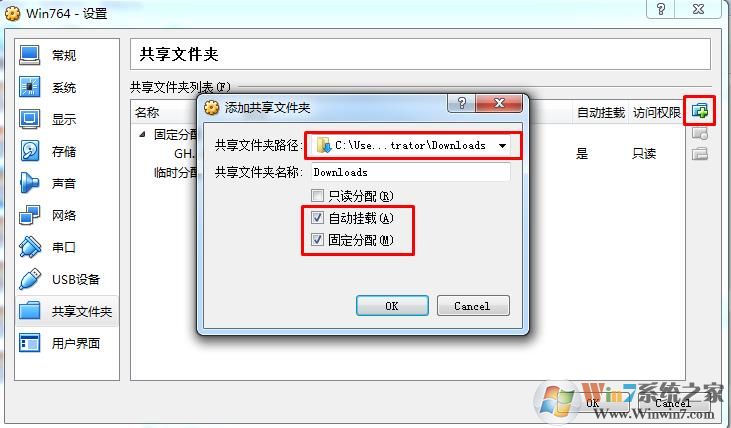
3、设置共享文件夹需要安装Virtualbox增强工具,在虚拟机中点击设备—安装增强功能;
执行下面的命令:
yum install -y gcc gcc-devel gcc-c++ gcc-c++-devel make kernel kernel-devel
安装完后,重启虚拟机:
shutdown -r now
点击 设置-->点击 安装增强功能...
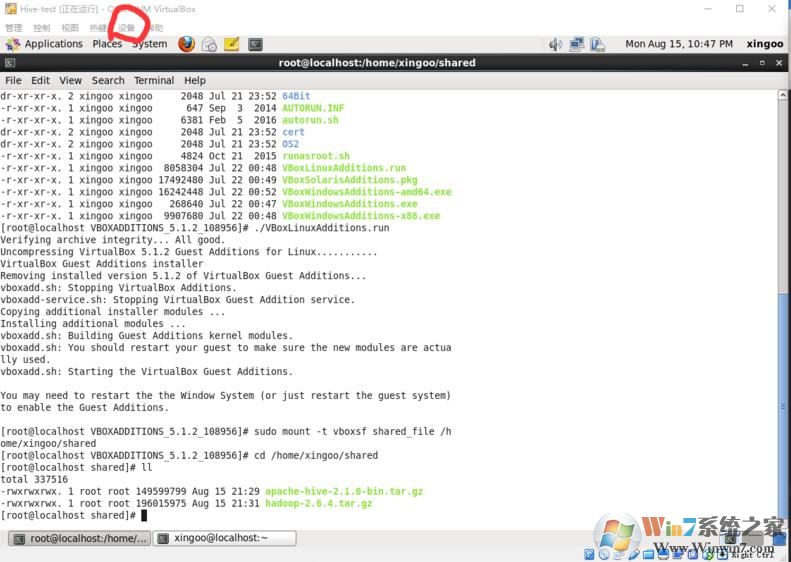
自动执行安装 或者 进入目录/media/VBOXADDITIONS_5.1.2_108956,执行命令
./VBoxLinuxAddtion.run
得到输出内容
[root@localhost VBOXADDITIONS_5.1.2_108956]# ./VBoxLinuxAdditions.run Verifying archive integrity... All good.Uncompressing VirtualBox 5.1.2 Guest Additions for Linux...........VirtualBox Guest Additions installerRemoving installed version 5.1.2 of VirtualBox Guest Additions...vboxadd.sh: Stopping VirtualBox Additions.vboxadd-service.sh: Stopping VirtualBox Guest Addition service.Copying additional installer modules ...Installing additional modules ...vboxadd.sh: Building Guest Additions kernel modules.vboxadd.sh: You should restart your guest to make sure the new modules are actually used.vboxadd.sh: Starting the VirtualBox Guest Additions.You may need to restart the the Window System (or just restart the guest system)to enable the Guest Additions.
即安装成功!
切换到root用户输入挂载命令:
sudo mount -t vboxsf shared_file /home/xingoo/shared
注意格式为
sudo mount -t vboxsf 共享文件夹名称(在设置页面设置的) 挂载的目录
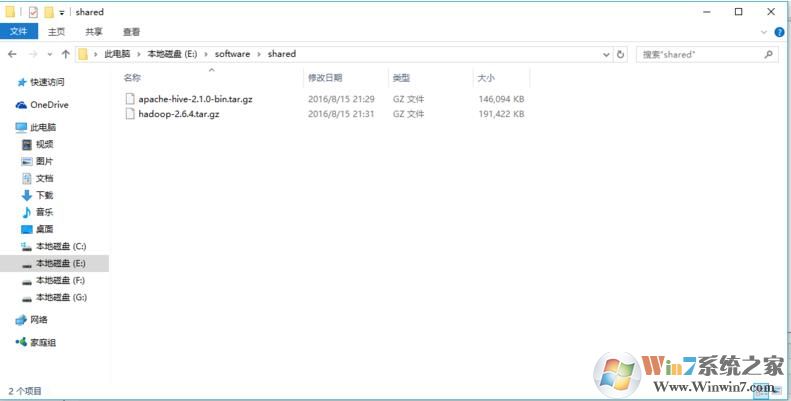
然后进入/home/xingoo/shared,就可以看到windows中的文件了

梦想三国之勇往直前0.1折

炼仙传说0.1折
仙侠01折
充值享永久0.1折福利,登录每日领2000免费代金券;;

不可思议的刀剑与魔法0.1折
卡牌01折
进游立送真充卡,开局自带“钞能力”

逍遥浪人
卡牌
1折送绝版皮肤 全场充值永久1折,创角即送“黑神话”孙悟空绝版皮肤。

奇幻梦旅人
休闲
当个无忧无虑的旅人,尽情享受这个童话世界吧!

玄影0.1折
仙侠01折
全场充值永享0.1折!

点击冒险之旅(0.1折特级行...
卡牌01折
上线福利:登录即送创角大礼包,召唤顶级战力!

天神赵子龙0.1折
卡牌01折
全新0.1折放置卡牌,打破传统三国叙事,解锁新颖剧情,每日送1000代金;

九州异兽记0.1折
开箱01折
1分钱买SSR异兽

龙魂魔法0.1折
185传奇996传奇
上线即送:自动拾取、自动回收、切割+222、老男孩·称号!

魔药杂货铺什么时候出 公测上线时...